Google has introduced a feature that deserves more attention from website owners, especially those investing in SEO and Generative Engine Optimization (GEO).
It's called Google Preferred Sources. It lets people tell Google which websites they'd like to see more often in search results.
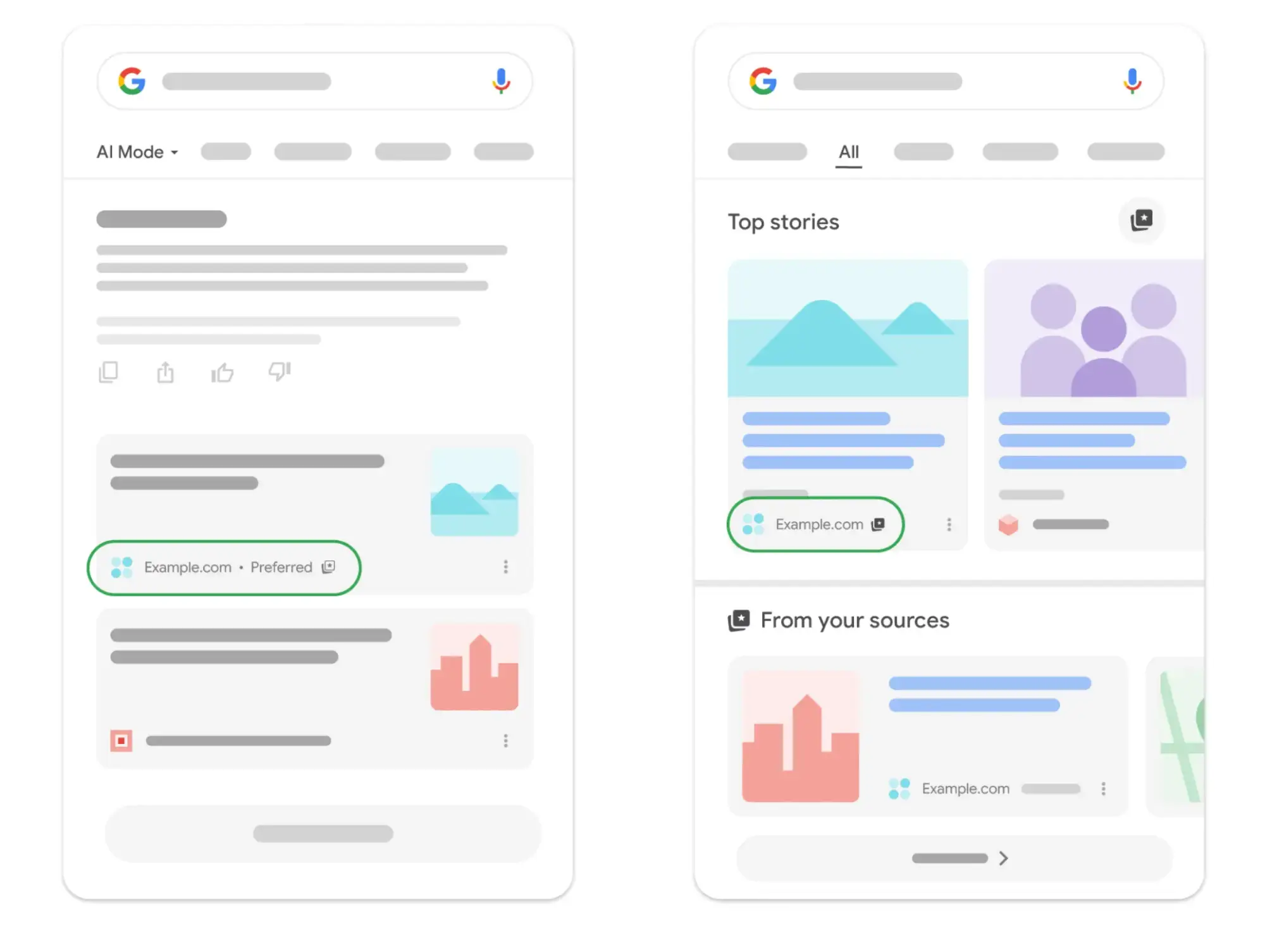
Preferred Sources now extends to Google's AI Overviews and AI Mode, too. Google can highlight content from a user's selected websites inside those AI search experiences.
For businesses, that's a chance to be more visible to people who already value their content.
Getting started is simple. Google now provides an interactive button that website owners can install with 2 lines of HTML. When someone clicks it, a small pop-up lets them add the website as a Preferred Source without leaving the article they're reading.
It won't guarantee more visitors or better rankings. But for that little effort, it's one of the easier additions you can make to your website.
What Exactly Are Google Preferred Sources?
Preferred Sources is a Google Search feature that lets users choose the websites they'd prefer to see when they search for information.
Once a website has been selected, Google can give its relevant content more prominence in Top Stories and mark it with a "Preferred" label in AI Overviews and AI Mode.
It works on individual preferences. Say you regularly read articles from a particular technology website. You can add that site to your Preferred Sources, and when Google later shows relevant content from that publication, it may highlight the site as one of your chosen sources.
This doesn't change how Google ranks the website for anyone else. It gives each user a way to say which publishers they value.
For businesses that publish regular articles, guides or industry information, that distinction matters. A visitor who finds your content useful can now tell Google they want to see more from your website.
Read Google's official Preferred Sources documentation.
Why Google Preferred Sources Matters for SEO and GEO
For years, most website owners have concentrated on their position in Google's traditional search results.
AI-powered search adds new considerations. Google AI Overviews and AI Mode can answer a question directly, while linking to the websites that support the answer.
A business might publish an excellent technical guide, a detailed product comparison or a clear explanation of an industry problem. That content could be relevant to someone searching with Google's AI features.
Preferred Sources adds one more possibility. If the person searching has already selected the business as a Preferred Source, Google may mark relevant content from that website with a Preferred label. That's another chance for the website to get noticed.
This is especially relevant to GEO, which is about how AI-powered search systems find your content and how they describe and cite it.
But we need to be precise about what Google has confirmed.
Google states that Preferred Sources can be highlighted in AI Overviews and AI Mode. It doesn't claim that installing the button improves your website's general rankings. It doesn't guarantee AI citations. And it doesn't promise more traffic.
Any benefit comes when visitors actually select your website. That's the most practical part of the feature.
Find this information useful?
Armitage publishes practical guidance on SEO, GEO and changes to AI search. If you'd like to find more of our content through Google, you can make us one of your Preferred Sources.
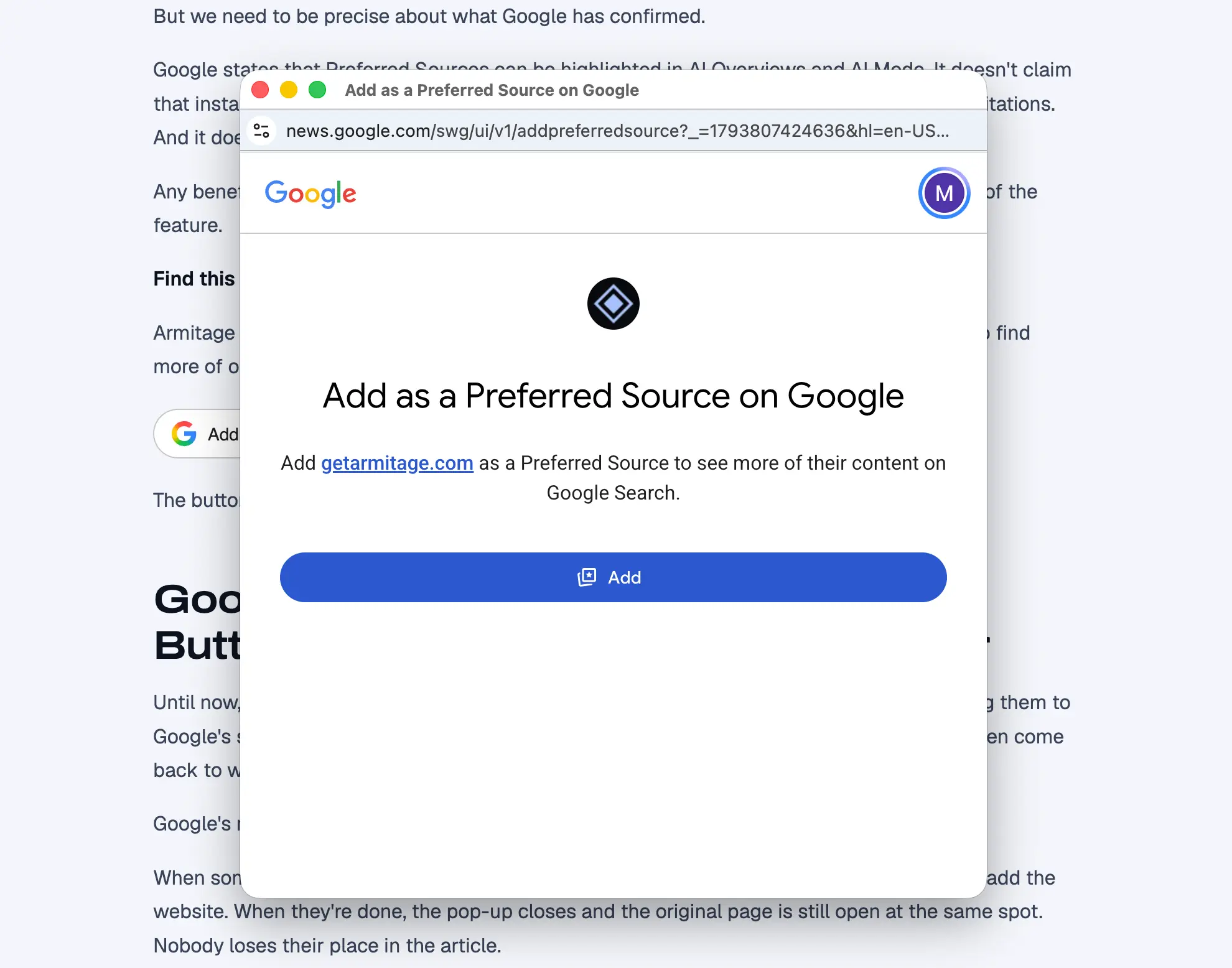
The button opens Google's selection pop-up without taking the visitor away from the article.
Google's New Preferred Sources Button Makes the Process Much Easier
Until now, encouraging visitors to add a website as a Preferred Source usually meant sending them to Google's source selection page. They had to leave the website, find or confirm the source, then come back to whatever they were reading.
Google's new interactive button removes most of that.
When someone clicks it, a small Google pop-up opens and the visitor confirms they want to add the website. When they're done, the pop-up closes and the original page is still open at the same spot. Nobody loses their place in the article.
That matters. Every extra step in an online process gives people another chance to give up, and this button cuts those steps down.
It also means website owners can put the button at the exact point where a reader is most likely to appreciate their content.
How to Install the Google Preferred Sources Button
In most cases, very little work is required.
Google provides a standard JavaScript version that needs 2 short lines of HTML. The first loads Google's Preferred Sources library. The second tells the browser where to show the button.
Here's how to install it.
Step 1. Load Google's Preferred Sources Script
Add the following line to your website, preferably inside the HTML <head> section.
<script async src="https://news.google.com/swg/js/v1/publisher.js"></script>This loads the JavaScript library responsible for displaying the button and handling Google's selection process.
You only need to load the script once per page, even if you want several buttons.
Step 2. Add the Button Where You Want It to Appear
Place the following HTML in the body of your webpage, at the location where visitors should see the button.
<div google-add-preferred-source-btn></div>That's it. Google's script automatically renders the interactive Preferred Sources button.
You don't need to enter your domain name into the standard code. Google identifies the website from the page where the button is installed.
When visitors click the button, Google's pop-up lets them confirm their selection without leaving the article.
Step 3. Choose the Button's Appearance
The standard button uses Google's design and automatically displays text in the visitor's language.
It comes with a light theme by default.
If your website uses a dark background, you can change the button to Google's dark version with this code:
<div google-add-preferred-source-btn data-theme="dark"></div>Google also offers an advanced implementation for website owners who want more control over the button's appearance.
For most websites, the standard button should be sufficient.
Step 4. Add the Button in More Than One Location
There's no need to load Google's JavaScript again for every button.
Once the script is loaded, you can insert the same button element wherever you want another invitation to appear.
For example, you might place one after a particularly useful paragraph and another near the end of an article.
Both use the same Google library.
What About WordPress?
On WordPress, you can usually insert the button using a Custom HTML block or the equivalent HTML element provided by your page builder.
The JavaScript library can be loaded through your theme, a code management tool or another suitable method that permits scripts to run.
Custom-built websites can use the same HTML implementation.
You don't need to buy a plugin or subscribe to another service to use Google's standard version.
Test any change on desktop and mobile before you publish it. Make sure the button appears correctly, opens Google's pop-up and leaves the original webpage in place.
Google's documentation provides the code and explains the additional customization options.
View Google's installation instructions.
Where Should You Place the Button to Encourage More Clicks?
Installing the button is easy. Getting visitors to use it takes more thought.
Hiding it in your website footer probably isn't the best approach. The real question is when a visitor is most willing to say your website is a source they value.
We suggest testing these positions.
Right After a Particularly Useful Paragraph
This is probably the most promising spot.
Picture someone reading a detailed explanation that finally answers a question they've been stuck on. It's clear, and it's exactly what they needed.
Right below that paragraph, they see a short invitation:
"Found this useful? Add us as a Preferred Source on Google."
The request makes sense because the reader has just been given something worthwhile. This is the position we'd test first.
Near the End of a Blog Post
Someone who has read a whole article has already shown they're interested in it. A second button near the end gives that visitor another chance to select your website.
For longer articles, 2 placements are usually enough: one after a particularly valuable section and one near the end. There's little reason to keep interrupting readers with the same request.
Within Detailed Guides and Resource Pages
Some pages hold information visitors will want to come back to. Technical guides, tutorials, product comparisons and industry explanations are good examples. These are sensible places to invite visitors to make your website a Preferred Source.
In Sidebars and Footers
A sidebar keeps the button visible on desktop. A footer makes the invitation available across the whole website.
But these spots may persuade fewer people, because they aren't tied to a moment when the visitor found something useful. We'd treat them as secondary options.
Don't Overlook Your Existing Audience
Google also provides a direct Preferred Sources link you can share outside your website. That opens up email newsletters, social media posts and other communications.
People who subscribe to your newsletter or regularly read your content may be the most receptive. They already have a reason to care about what you publish, and a simple invitation in a newsletter could be enough to get them to select your website.
Use the direct Google link for those communications. On your website itself, we recommend the newer pop-up button.
What Evidence Is There That Google Preferred Sources Helps?
Google has published some encouraging figures.
In April 2026, it reported that readers were twice as likely to click through to a website after selecting it as a Preferred Source. It also reported that users had already selected more than 200,000 unique websites.
In August 2026, Google said more than 600,000 unique sources had been selected.
Then in October 2026, Google announced that the number of people using Preferred Sources had grown more than sevenfold since the start of the year.
These figures show the feature is attracting growing interest. But they need careful reading.
The click-through figure doesn't mean installing the button will double your traffic. It describes how people behave after they've already selected a website. And there's no guarantee that any particular business will get more visitors.
Still, the figures give a reasonable basis for taking the feature seriously. Google is actively developing Preferred Sources and building them into its AI search products. For website owners, that makes the small installation effort worth considering.
Can Any Website Become a Google Preferred Source?
Google's source preferences tool is available to eligible websites at the domain or subdomain level. A business doesn't have to be a major news publisher to be considered.
However, a website has to appear in Google's source selection tool before users can add it. You can check by going to Google's Preferred Sources tool and searching for your domain.
Google also explains that, to be eligible for Preferred Sources display in AI Overviews and AI Mode, a website must be included in Search's generative AI features through the relevant Search Console controls.
The AI search features themselves aren't available in every location and language.
Before you add the button, confirm that your domain appears in Google's selection tool.
How Should You Measure Results?
We recommend starting with 2 button placements: one after a strong section of content and one near the end of the article.
You can then use your website analytics to compare how often visitors click each button. Over time, test the invitation wording, its position and the types of articles where it appears.
Keep in mind that a click on the button doesn't necessarily mean someone completed Google's selection process. That difference matters when you judge the results.
Keep an eye on organic search traffic and engagement too, but don't automatically credit any change to Preferred Sources.
The first goal is simple: find out whether your readers are interested enough to click.
Is It Worth Adding Google Preferred Sources to Your Website?
We think so.
The technical work is small, Google's official button is ready to use, and the feature gives readers an easy way to say they prefer your website.
There's no guarantee it will improve your rankings or bring in more traffic.
But Google has confirmed that selected sources can get special treatment in supported search experiences, including AI Overviews and AI Mode. For businesses already investing in helpful content, that's a reasonable opportunity.
What matters most is making the invitation visible and giving readers a reason to act. A button tucked away in the footer may do very little. One placed right after an excellent explanation could get far more attention.
Test both the placement and the message.
With so little effort required, Google's Preferred Sources button is a sensible addition to an existing SEO and GEO strategy.
Want More Practical Advice on AI Search?
We publish guidance to help businesses understand changes in search and decide which improvements are worth making.
If you've found this article useful, consider making Armitage one of your Preferred Sources on Google.
It only takes a moment, and you can finish the selection without leaving this article.
Related reading: What is generative engine optimization (GEO)?, GEO vs SEO and the free AI visibility checker. More on the Armitage blog.
Frequently asked questions
What are Google Preferred Sources?
A Google Search setting that lets people choose the websites they want to see more often. Google can then give those sites' relevant content more prominence in Top Stories and mark it with a "Preferred" label in AI Overviews and AI Mode.
How do I add Preferred Sources to Google Search?
Go to Google's Source preferences page, search for the website and tick it. You can also press a site's own "Add to Preferred Sources" button, which opens a small Google pop-up where you press Add.
How do I add the Google Preferred Sources button to my website?
Add Google's one-line script to the head of your page, then put the button's one-line div where you want it to appear. You don't need a plugin or your domain name in the code. The exact code is in the steps above.
Does the Preferred Sources button take visitors off my page?
No. A small Google pop-up opens over your page, and when the reader presses Add it closes with the article still open at the same spot. We tested this on a live page: the pop-up stayed open until Add was pressed. If a reader's browser blocks pop-ups, Google's script opens the selection page in that same tab instead.
Does the Preferred Sources button improve my Google rankings?
Google doesn't say it does. It doesn't claim that installing the button improves your general rankings, guarantees AI citations or promises more traffic. A selection only changes what the reader who chose your site sees.